
Replace Honeywell thermostat batteries
Match the full model number first. These Honeywell thermostats use different battery sizes and different ways to reach the compartment.
RTH2300B1012/1038, T6 Pro TH6210U2001/TH6220U2000/TH6320U2008, and TH5220D1003. Official manual finder ↗
RTH2300B1012 / RTH2300B1038
RTH2300B: two AAA alkaline batteries
- Move the System switch to Off before removing batteries. The manual warns the equipment could otherwise stay activated.
- Release the thermostat at the bottom and turn it over. Leave the wired wallplate in place.
- Replace both AAA alkaline batteries, matching the marked polarity.
- Reattach the thermostat, reset the clock and day, then restore the intended mode.
The program settings are retained, but the clock and day need setting again. Do not use battery removal to erase a schedule.
Official RTH2300B battery instructionsRTH2300B clock instructionsBack to tasks ↑TH6210U2001 / TH6220U2000 / TH6320U2008
T6 Pro programmable: two AA alkaline batteries
- Have the replacement AA alkaline batteries ready and note the time/day.
- Gently pull the thermostat from its wall mount, leaving the mount and wiring attached.
- Replace the batteries following the polarity marks, then reinstall the thermostat.
- Check the time, day and intended operating mode. Set the clock again if needed.
The guide says inserting the replacements within two minutes preserves time/day. Other settings are in permanent memory. Batteries may be backup when the thermostat is powered by AC wiring.
These steps are not for T6 Pro Smart Wi-Fi or Z-Wave. Use the full model number rather than the T6 name.
Official T6 Pro battery instructionsT6 Pro time and date controlsBack to tasks ↑TH5220D1003
FocusPRO TH5220D1003: use its pull-out holder
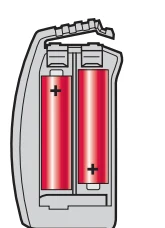
- Press down on the holder release and pull the battery holder out.
- Fit fresh AA alkaline batteries according to its polarity marks. Reinstall the holder.
- Check that the display returns and the intended system and fan settings remain.
The manual describes optional battery backup on an AC-powered installation, and permanent storage of the settings. Removing the batteries does not erase those settings.
If the holder will not release normally, do not pry a different thermostat housing apart. Verify the model and its access instructions.
Official TH5220D battery-holder instructionsBack to tasks ↑After replacement
A blank screen is not always a battery problem
Check the battery size, + and − directions and that the holder or thermostat is seated as its manual shows. A C-wire-powered thermostat can also lose display power for a separate equipment-power issue.
If the screen stays blank, use the exact model’s troubleshooting instructions. Do not bridge terminals, bypass a safety switch or assume a factory reset is required.
Corrosion, leakage or a damaged compartment needs appropriate service or replacement guidance. Do not force swollen or stuck batteries out through the electronics.
Get troubleshooting for the exact modelBack to tasks ↑Other models
Stop if your label is not one of these models
Check the full model on your documents or label. Some Honeywell thermostats have a side drawer, others detach from a mount, and some depend on system power. No single battery instruction fits all of them.
Find the official manual for another modelBack to tasks ↑Sources and related guidance
Exact model battery/access instructions checked against manufacturer manuals on October 17, 2026. The procedures cover the listed models only.